
On Thursday, June 6, we examined the update situation for devices from Android, Apple and Microsoft. Is it really a problem if your smartphone is stuck on Android 12? (the latest version is 15 released in October 2024)
ANDROID:
All Android devices run on the Android Operating System (OS), which is like your smartphone’s brain. It manages software updates, apps from Google Play, and security patches to keep everything running smoothly so you can play games, chat with friends, browse the internet, and more. Every year, Android updates introduce new features and security updates that improve both functionality and user experience. New versions are necessary for new hardware. Typically, phones released in the last 2–3 years are candidates for the latest updates. https://www.optimum.com/articles/mobile/latest-android-version
What happens if your phone is too old for the latest version ??
“It will continue working. If you wait long enough, apps may no longer work in an old enough version of the OS (think being 6 or more versions behind) simply because developers do not keep their apps working for older OS versions. Of bigger concern is lack of security patches (usually security patch updates continue longer than feature/OS updates). Every patch that you do not receive is a vulnerability unfixed on your device. The longer that continues, the more you will have”. https://www.reddit.com/r/AndroidQuestions/comments/1easb2g/what_happens_to_your_phone_when_there_are_no_more/
However:” Google has offloaded some of its updating mechanisms to Google Play System Updates — part of Project Mainline that rolled out in Android 10. This allows Google to upgrade some core Android modules without relying on phone manufacturers to deliver a traditional firmware update. Google can patch Media Codecs, Media Framework Components, the Permission Controller, Network Permission Configuration, ART, and several other components quickly and easily through the Play Store. Of course, Android devices that don’t use Google’s services don’t benefit.” e,g Android 12 was rolled out in October 2021, a system update was released in April 2025. https://www.androidauthority.com/phone-not-supported-updated-anymore-3389532/
Google also checks to see if your apps are clean. First check that “Play Protect” is enabled in your phone (Settings/Security) Tap on the Google Playstore app and search for “Play Protect”. You should see this screen:
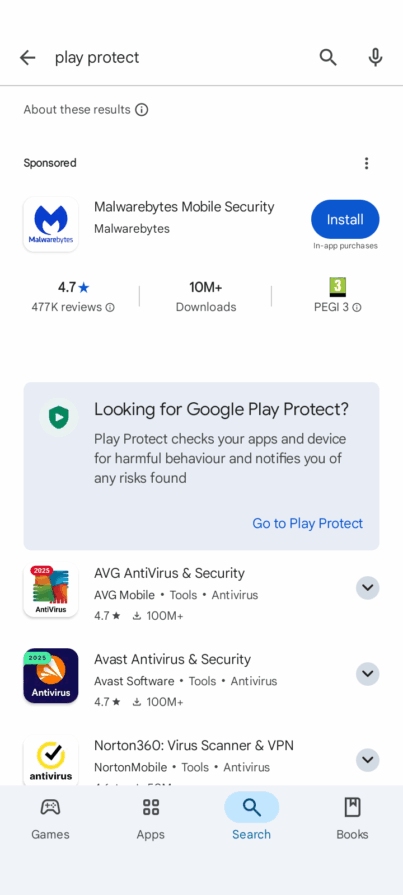
Tap on Go to Play Protect and you will see this:
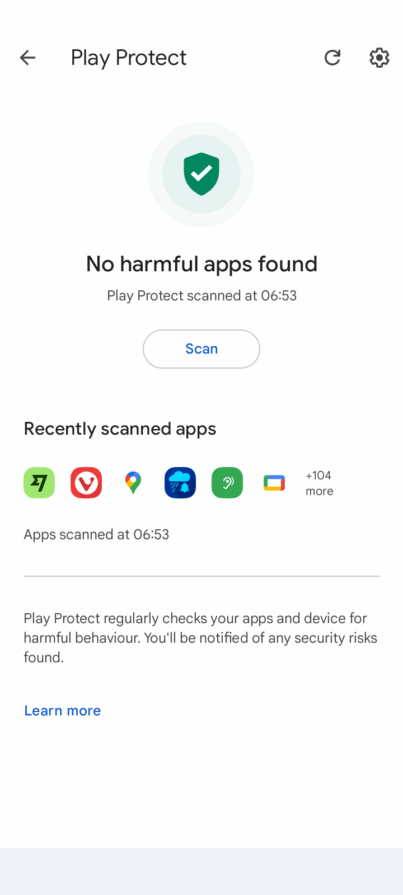
Tap on Scan – and Google will scan all your apps to check that none are infected. Be sure to install all your apps from the PlayStore to be sure they have been curated by Google.
To remove Android malware online, consider running an antivirus scan with a reputable app like Malwarebytes, AVG.com, or Avast. If malware is detected, follow the app’s instructions to remove or quarantine it. https://www.malwarebytes.com/solutions/virus-scanner
Breaking news: Starting June 1, 2025, WhatsApp will discontinue support for older Android devices below version 5.1. This update, delayed from May 5th, aims to enhance security and performance by leveraging newer OS features.
APPLE :
iPad: “Some of my older iPad apps won’t update: I have an older iPad some and my apps won’t update how can I fix the issue please help“
Whether or not Apps will be updated is fundamentally linked to the installed version of iOS/iPadOS. For older models of iPad that cannot be updated to the current version of iPadOS, compatible Apps or App updates for older models of iPad may not be available. You may need to consider that App Developers have dropped all support for 32-bit devices (see below for list) – and many for iOS versions preceding iOS11/12/13. As older versions of Apps are removed from the Apple App Store, you’ll not be able to (re)download or install them – which may severely limit the usefulness and utility of your iPad. As such, if you want or need to access most current Apps, requiring more recent versions of iOS than your iPad is capable, you’ll need to consider replacement of your iPad with a newer or current model. https://discussions.apple.com/thread/254289816?answerId=258039765022&sortBy=rank#258039765022
Google’s Gemini AI says:
The latest version of iPadOS is 18, and it’s compatible with iPad Pro (M4), iPad Pro 12.9-inch (3rd generation and later), iPad Pro 11-inch (1st generation and later), iPad Air (M2), iPad Air (3rd generation and later), iPad (7th generation and later), iPad mini (A17 Pro), and iPad mini (5th generation and later).
Older iPad models, specifically those from before 2019, are generally not compatible with iPadOS 18. For example, the iPad 6th Gen and iPad 7th Gen can run iPadOS 17, but don’t support advanced features.
To determine your iPad’s compatibility, you can go to Settings > General > Software Update to see if an update is available for your model. You can also find a list of supported models on Apple’s website or endoflife.date.
iPhone:
Gemini says: The latest version of iOS is iOS 18, and it’s compatible with iPhones starting from the iPhone XR, and all later models. Specifically, the iPhone XS and XS Max, which have the same A12 Bionic chip as the XR, are also compatible. Older models like the iPhone 8 and 7 will not receive iOS 18 https://www.zdnet.com/article/every-iphone-model-compatible-with-apples-ios-18-and-which-ones-arent/ Most of the newest AI features in iOS 18 are reserved for the iPhone 15 Pro and the newer iPhone 16 models, as they require the processing power of an A17 Pro chipset or later and 8GB of RAM or higher. However, iOS 18 is still available for many older iPhone models.
Iphone X released in 2017 will not get the update.
Starting June 1, 2025, WhatsApp will stop working on several older smartphones as it raises its minimum system requirements. iPhones must now run iOS 15.1 or later, Models like iPhone 5s, 6, 6 Plus will lose support.
In recent years support for new iOS versions has stretched back for around six years, while, if you include the versions that Apple supports with security updates, the cover goes back a further year. See chart on: https://www.macworld.com/article/675021/how-long-does-apple-support-iphones.html
Stop Press June 1st 2025 Security warning for iPhone users: https://metro.co.uk/2025/06/01/warning-issued-1-800-000-000-iphone-users-security-risk-23303351/ The vulnerability that needs to be patched is that malware hidden in a rogue image or video file, could upon opening make an app crash or mess up your phone’s memory before causing glitches and even security risks.
MacOs:
If your Mac is unable to update to the latest macOS, you might experience decreased security protection and potential compatibility issues with newer software or websites. Additionally, your Mac might become less compatible with current web standards and applications over time, requiring you to find older versions or alternative solutions. However, if your Mac is still within Apple’s support window (generally 5-7 years for vintage and 7+ years for obsolete), you should be able to receive security updates even if you’re not able to upgrade to the latest OS. Sonoma is the current OS while Apple will still supply some limited security updates to Ventura (near the end of 2025 ) and Monterey (near the end of 2024).
So, Monterey is at the end of its life, although it still supports the Adobe Premiere suite of programs. MacBooks Air from early 2015 are able to use Monterey (released 2021). This is important for people who use Adobe Premiere.. https://helpx.adobe.com/premiere-pro/system-requirements.html . Hence a 10 year old MAC could run Adobe, although Apple is no longer apparently supplying security updates..
MICROSOFT Windows:
After October 14 Windows 10 will still function, but it will no longer receive security updates or technical support from Microsoft. This means your computer will continue to work, but it will become more vulnerable to security risks and viruses. We considered user’s options in a previous discussion https://javeacomputerclub.com/2025/05/15/windows-10-deadline-oct-14th-2025/
Microsoft recommends upgrading to Windows 11. But there are minimum hardware requirements: https://www.microsoft.com/en-us/windows/windows-11-specifications?ocid=smc_marvel_ups_support_win11 These include a TPM chip which is used for security encryption.
The oldest PCs that can officially run Windows 11 are those with an Intel 8th generation CPU or an AMD Ryzen 2nd generation CPU. These CPUs were launched in October 2017 (Intel) and April 2018 (AMD) respectively. Additionally, all supported PCs must have Trusted Platform Module (TPM) 2.0 support and Secure Boot enabled in the BIOS. For laptops this will probably mean those made from 2020 onwards..
Windows 11 can be unofficially installed on incompatible PCs: https://www.4ddig.net/hard-drive/bypass-windows-11-requirements.html However, Microsoft doesn’t like it and is blocking techniques for doing this. There’s no TPM security. Minor updates work OK (so far), but major (annual) upgrades will need a complete reinstall, which means backing up all your personal files, then reinstalling Windows and all your applications again.
Options:
- Use Windows 10 without security updates
- Pay for updates . This is a short term solution lasting 1 year.
- Force install Windows 11 and take a risk on possible insecurity and incompatibility.
- Switch to Linux. It’s free, no ads or nagging, Linux Mint looks a lot like Windows. It comes with LibreOffice, and once you’ve installed Google Chrome, you’d hardly know it wasn’t Windows.There’s a campaign to encourage people to make the switch. https://endof10.org
- Ditch your old PC, Buy a new one with Windows 11 – though this will add to the pile of obsolete phones and PCs
But why ditch anything? – old phones and tablets may have some life in them yet! We’ll take a look at re-purposing your old devices in another JCC session.
Chris Betterton-Jones – Knowledge Junkie