
Google provides a free online office suite (now called Google Workspace) for Google account holders. This includes a wordprocessor, spreadsheet, and apps to create slide shows and survey forms. Files can be shared, edited online or offline and are accessible from any device logged in with your Google account, including mobile phones. Documents can be shared online for editing, or just for viewing to selected people or made public for viewing over the Internet. Users with a Premium (paid for ) Google account can use Gemini AI to help create documents, spreadsheets and presentations.
All these are stored in your online Google drive and share its 15GB free cloud storage space with your Gmail, Google Photos and other files on Google Drive.
The apps can be accessed from the App (waffle) menu, which is the icon of nine dots beside your Gmail profile picture.

The Wordprocessing app is called Google Docs. It provides several templates and has all the editing tools found in other major word processors. In addition Google Doc files can be shared, edited, marked up and and commented upon by collaborators. It also has a built-in translation tool that allows you to translate an entire document into over 100 languages, creating a new, translated copy while leaving the original file unchanged. You can also use voice recognition to dictate the content of a Google Doc. This is particulary easy when using a mobile phone. The programme can also open and edit Word and OpenOffice files, but these need to be saved as Google Doc files to make use of advanced editing features.
The Spreadsheet app is called Sheets. It works like Excel and imports Excel files. There are many useful templates including an Annual calendar, budget and to do lists. In addition it has tools for collaboration and built-in pivot tables, charts, graphs, and functions which help to analyse and visualise data.
The slideshow app is called Slides. It is much like Powerpoint with themes and animations. Users with premium (paid for) accounts can create videos from their presentations and even create an AI voiceover.
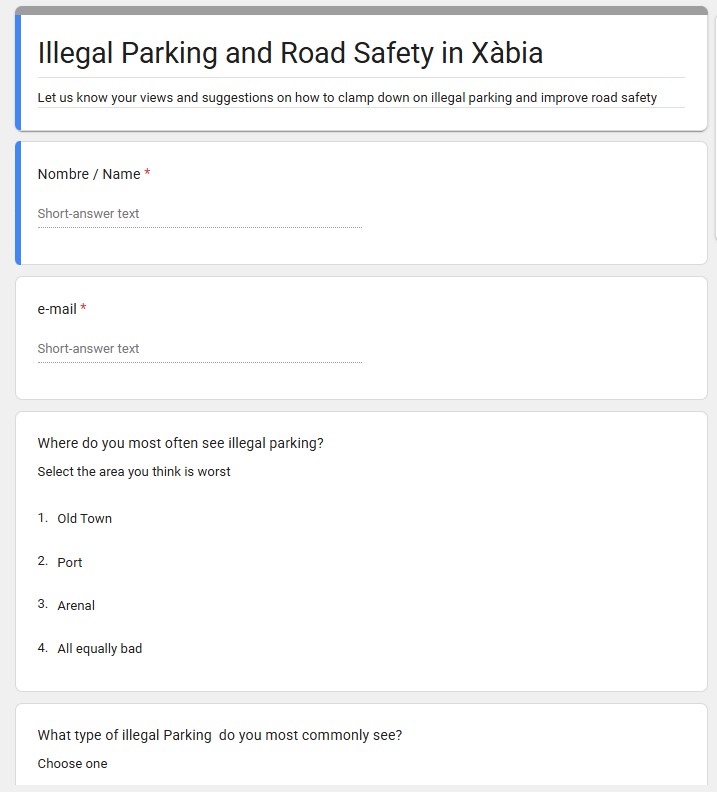
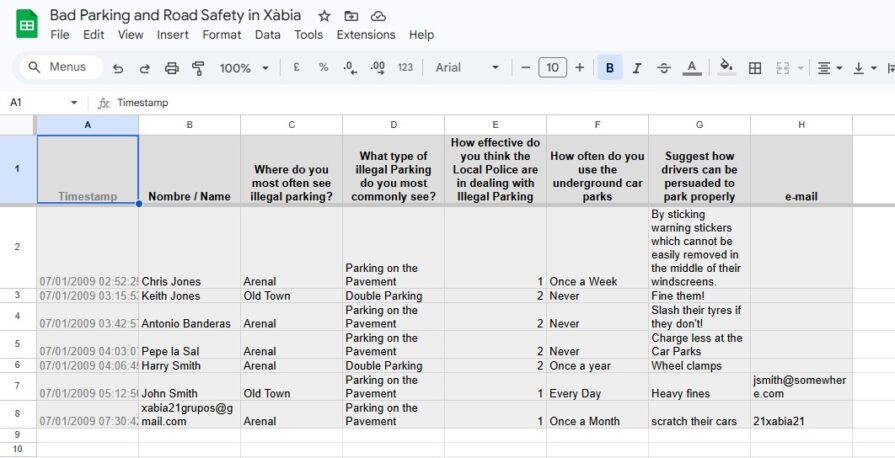
Google Forms is an underappreciated app. It enables you to create questionnaires and post them on-line. Google provides templates for contact information, RSVP, Event and party invitations etc. or you can design your own, using a variety of check boxes, bullet lists and text fields. You then send your target audience a link to the form asking them to complete it. The completed, submitted forms appear in your Google Sheets app as a tabulated spreadsheet. See the experimental example below:
Firstly, here’s what the Google Form questionnaire looks like:
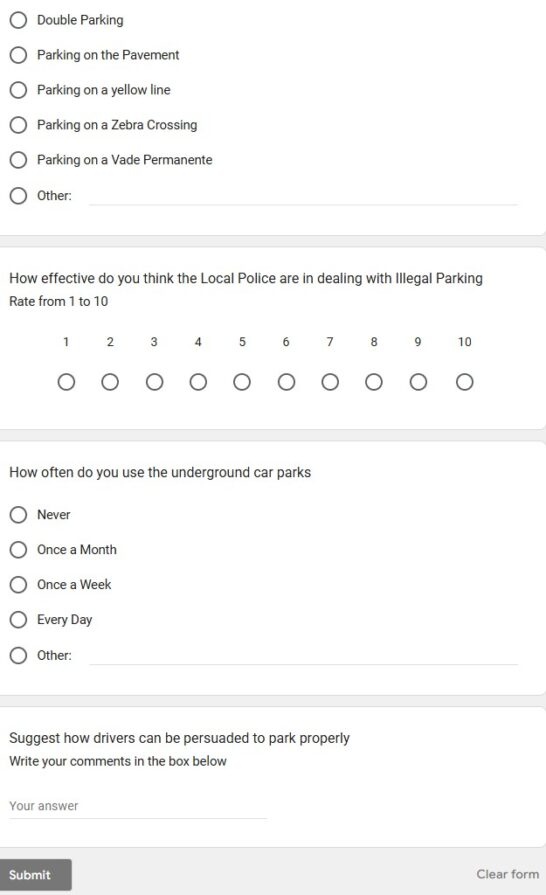
Secondly, here are the results from forms which have been completed and submitted which are automatically put into a spreadsheet.
Google provides extensive online tutorials to help people get started with the Google Office suite, and migrate to it from Microsoft Office
Google Docs training and help: https://support.google.com/a/users/answer/9282664
Google Sheets training and help: https://support.google.com/a/users/answer/9282959
Google Slides training and help: https://support.google.com/a/users/answer/9282488
Google Forms training and help: https://support.google.com/a/users/answer/9991170
Have fun!
Christine Betterton-Jones – Knowledge Junkie