
On Thursday, 29 May, we looked at how these major AI tools are becoming integrated into Microsoft, Google and Apple products and how people currently use AI Large Language Models (LLMs – or Chatbots)
Here are some key takeaways.
The things that people use AI for are changing: https://www.visualcapitalist.com/ranked-all-the-things-people-use-ai-for-in-2025/ According to a study of online forums, in 2024 the top use was to generate ideas, in 2025 it was for “Therapy and Companionship” – This is an interesting reflection on how society is changing.
Club members who serve on committees use AI to summarise long texts and re-write web page information. This became evident when we discussed the uses described in the following article which covers both general and specialist AI tools: 31 Ways You Can Use AI Today (2025 Guide) https://www.elegantthemes.com/blog/business/how-to-use-ai . Peter pointed out the pitfalls of using AI to help with writing code since AI tools can hallucinate and be tricked into inserting malware into their code. We noted that when using ChatGPT and specialist writing AIs, you can tell them what style to use: “Like a bank manager”, “Like Jane Austen”, “Like a comedian”. AI tools can even write spreadsheet formulae for you. Midjourney is a well-known AI tool, which generates images from text prompts. This skill has recently been incorporated into Chat GPT. Here’s an example of ChatGPT’s artwork:

The major AI tools packaged with browsers or Operating system, cannot be uninstalled, though they can be disabled
Siri: Apple’s Intelligent assistant. This app isn’t particularly intelligent. It is integrated into the Apple environment and cannot be uninstalled, though it can be turned off or disabled. Siri can be synchronised across different devices with the same Apple ID using the iCloud, but this can be turned off. It was pointed out that Apple users’ data are very secure and that the iCloud cannot be hacked (unless someone has your Apple ID information) There’s nothing to stop Mac users using independent AI tools such as ChatGPT however, which may well store data about you.
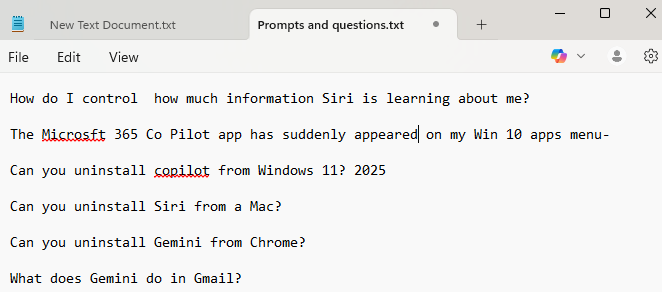
CoPilot: This is Microsoft’s AI tool. It is available for free as an AI search feature in Microsoft Edge and there’s a more feature-filled AI app called “Microsoft 365 CoPilot” which is promoted in Windows 11 Professional. This enables you to use AI tools in Microsoft Office programs such as Excel and Word, and more disturbingly its brightly coloured logo pops up in the corner of a Notepad document – offering its editing services.
However, there’s a big caveat – to use these features you have to pay a subscription. “Microsoft 365 Personal
$99.99/year” or if you want to pay monthly it’s $10.00 per month. There’s another plan for up to six users.
If you use Co-pilot for searching in Edge you can search anonymously (by not signing into your Microsoft Account) or by using an “InPrivate” window. You can also delete what CoPilot knows about you by modifying its privacy controls: https://support.microsoft.com/en-us/topic/microsoft-copilot-privacy-controls-8e479f27-6eb6-48c5-8d6a-c134062e2be6
Gemini: This is Google’s AI tool. Its logo is an animated blue star. It’s activated whenever you search with Google, no matter what browser you are using, and provides an overview and detailed breakdown when answering questions, including links to sources. e.g.
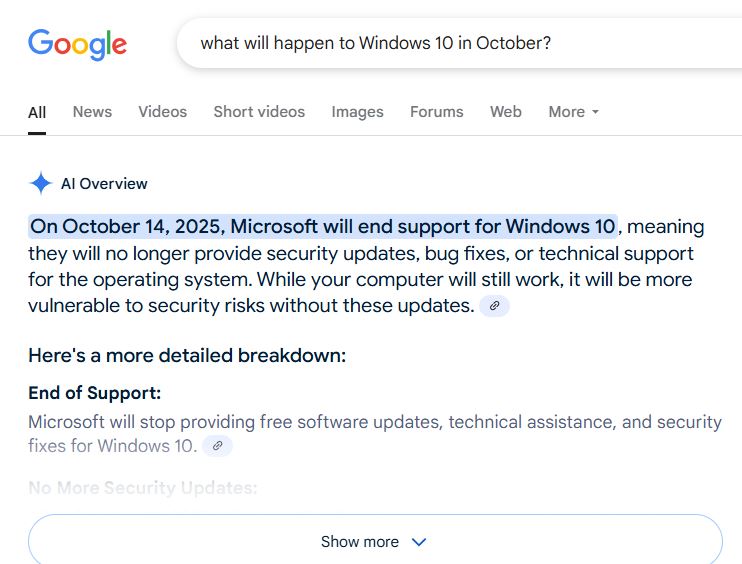
If you log into your Gmail account on a PC you will find more Gemini Tools among the Google Apps. (Accessed via the icon of 9 dots arranged in a square next, top right) First, there is the Gemini Chatbot as a stand-alone App. This is free and behaves like ChatGPT and the Co-Pilot Chatbot in Edge.
There’s Google Gemini Pro in Google Mail, Google Calendar and Google Drive. But here’s the Gotcha – You’ve got to pay a subscription to use it!
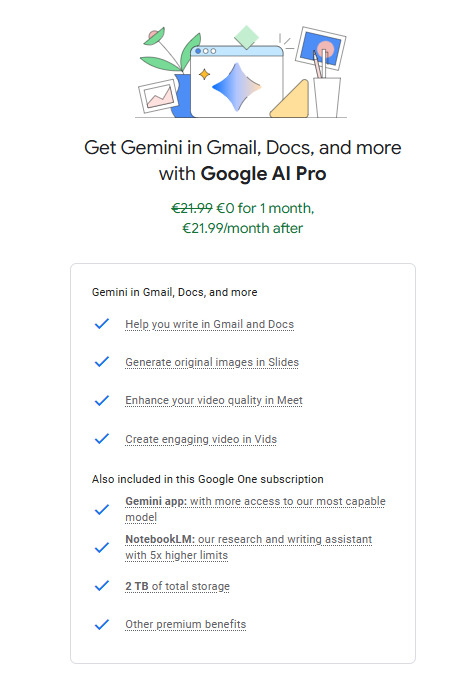
(The Microsoft offering seems to be a good bit cheaper!) Google is pushing these AIs to people who are “Google One” members – i.e. people who already pay Google for extra cloud storage space. They are also touting a subscription AI for Google Photos called “Magic Editor“. This is beginning to sound quite expensive….

Gemini tells me you can turn Gemini off: Here’s how:
You can “turn off” Gemini in various ways, primarily by managing its activity and disabling certain features within Google services. Here’s a breakdown:
Managing Gemini Apps Activity (for the Gemini web app and mobile app):
Turn off Gemini Apps Activity: This is the most direct way to stop Gemini from saving your conversations and activity.
Go to gemini.google.com.
- Click “Settings & help” (or tap the Menu icon in the mobile app) > “Activity”.
- Near the top, click “Turn off” (you might see “Turn off” or “Turn off and delete activity”).
- Important: Even when turned off, your conversations may be saved for up to 72 hours for service provision and feedback processing, but they won’t appear in your Gemini Apps Activity.
Delete Gemini Apps Activity: You can delete past activity for specific periods or all time.
- Go to gemini.google.com or myactivity.google.com/product/gemini.
- You’ll see options to delete activity for the last hour, last day, a custom range, a specific day, or all time.
Change Auto-delete settings: By default, Gemini Apps activity older than 18 months is auto-deleted. You can change this to 3 or 36 months, or turn off auto-delete entirely.
- Go to gemini.google.com > “Settings & help” > “Activity”.
- Click “Deleting activity older than … months” or “Choose an auto-delete option.”
New developments rolling out in Gemini are either useful…or intrusive – depending upon how you look at them. It can be used to remember things: “Gemini can now recall your past chats to provide more helpful responses,” explains Google. “Whether you’re asking a question about something you’ve already discussed, or asking Gemini to summarize a previous conversation, Gemini now uses information from relevant chats to craft a response.” Fortunately, you can tell it to forget.
https://www.popsci.com/diy/how-to-erase-google-gemini-memory/
It can also dig through long-forgotten e-mails and dredge up information you might prefer to have remained forgotten!: https://www.pcmag.com/opinions/i-gave-gemini-access-to-my-gmail-and-it-weirds-me-out
One thing is for sure. These AI tools are here to stay, and they are becoming more integrated into our daily lives by the minute. Whether you like it or not.
Chris Betterton-Jones – Knowledge Junkie